Unwrapping the welcome offer for Live Play Mobile bingo
I received four bonuses as part of the welcome offer on the Live Play Mobile social bingo app:
- 50 Bingo Credits
- 10,000 Coins
- 35 Power Ups
- 1 million Slot Bucks
Each one allows you to do different things on the app. I found them all in the app when I first downloaded it, but it would have been nice to have some explanation of what each one does. Fortunately, there’s a full review for that, so if you want more details on your welcome offer, you can go over to the bonus review to get them.
Social Casino Daily Bonus
2 FREE Bingo Credits
18+, Other T&Cs Apply
My Live Play Mobile review of the app format and usability
The app is colorful, certainly, and you will go through a demo game when you first download it. You will need to play a live social bingo game prior to being able to explore the app though, which was a bit disappointing. It didn’t take too long before I could look around though. It seems you can only access the few available slot games when you are inside a live social bingo game. When I arrived on the app, I spotted the main event that was live then, while swiping left or right gave me info on upcoming social games to play as well.
I also spotted my next Daily Gift to the left of the screen, with a countdown that informed me of how much longer it would be to claim my next bonus. The daily offer drops every six hours. I was also able to keep track of my Coins, Bingo Credits, and Power Ups at the top of the screen.
The whole service comes via a mobile app
Normally, this is where I’d share details of whether a site has a mobile app or not. It’s clear that Live Play Mobile does, since it mentions it in the name. You can visit the Live Play Mobile website, where the creators share some info about the app, but you need to download it to access the service, as I did when compiling my Live Play Mobile review.
I got the iOS app on my iPhone, but you’ll find the equivalent in the Google Play Store if you’re an Android user. When you download it, you need to say whether you’re a new player, and if you are, you can either pick a name or they’ll choose one for you. You’ll then get a quick run through of how the social bingo games work before going straight into your first one. I found I had to play this first one before I could access the menu or any other areas of the app.
Considering the size of the screen on a smartphone, there’s plenty going on, and it can be a little confusing to get a feel for the site when you’re new. The apps have plenty of reviews, mostly positive, and you’ll find live hosts in the app to take you through the latest social bingo games there.
![Live Play Mobile Casino Mobile Play]()
Live Play Mobile Play
![Live Play Mobile Casino Chat]()
Live Play Mobile Chat Promos
Is Live Play Mobile legit? Assessing payment possibilities
I found plenty of ways to pick up some freebies on the app once I was all set to play. As I noted earlier, there are plenty of different bonuses you can collect, from Bingo Credits to Slot Bucks and Power Ups. There is no requirement to purchase anything, but the app does include a store that you can access from the bottom of the app screen. The Store allows you to purchase various things, from individual items such as a bundle of Power Ups to a pack which may contain three different types of items.
Since you’re inside an app, you will make any purchase through the App Store for iOS devices or the Google Play Store for Android devices. As such, you need to set up a payment method with the relevant store to be able to make any optional purchases through the Live Play Mobile app.
How do I rate their customer service features in my Live Play Mobile review?
Once I’d gone through the first social bingo game and could access the app in full, I noticed the typical burger icon in the top left of the app. Right at the bottom of the menu that pops out when you tap the three lines in the burger icon, there is a help option. Tapping on this takes you into the help center.
The FAQ there is divided into various sections to make it easier to navigate. I’d suggest starting with the How to Play section, as I found that quite useful in figuring out how the app works. I learned about some of the bonus items I received when I first downloaded the app, so I could figure out how to use them.
There are sections on bonuses, purchases, slots, and various other topics as well. I didn’t see the option to enter a live chat anywhere, which is slightly surprising given that the app is known for its real social bingo hosts. You can get in touch if you need to though, by accessing the form at the bottom of the help center. Fill it in and submit it to send a request to the app owners.
| Customer Service |
 |
| Available Languages: |
English
|
| Email: |
support@liveplaymobile.com
|
My Live Play Mobile review reaches the licensing section
Ownership of the app rests with Live Play Mobile Inc., and after some exploration of their main website, I discovered their headquarters are in San Francisco, California. They also have broadcasting locations around the world, including London and Los Angeles. There’s no license for the app and it doesn’t need one, since it offers social bingo games and doesn’t have any real money prize potential. However, the creators do need to follow the rules laid down by the Google Play Store and App Store, otherwise the apps wouldn’t be available in either place.
Becoming more familiar with the loyalty program at Live Play Mobile
My first avatar was a teddy bear, but I could change that once I’d reached level two inside the app. I’ve shared that fact because you’ll see a gold star with a number inside it underneath your avatar, and that tells you which level you’re at. It was hard to tell how many levels there are, since there’s no way of finding out exactly how the system works. However, I soon realized that by playing the social bingo games, I could collect Experience Points (XP points). If you tap on your avatar, you will see how many more XPs you need to reach the next level. Different parts of the app become available as you go through the levels, so you can change your avatar, your avatar frame, and reach features such as Bingo Moments, for example. I did notice that there is a level 60, followed by Master League and Baller League, but I guess it might take a while to reach those.


 Available with Dimers Pro

















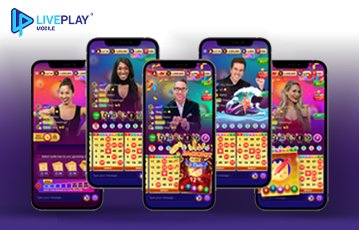





































Obviously, it’s about social bingo, and when I accessed the app, the next game coming up was right in the center of the app screen. I hit play, and found myself looking at the current host and could participate. To the right of the screen, I spotted an option to go to the slots. This made the Slots Room pop up, where I could choose a bingo mini-game or the Wild Riches slot. Two other slots were locked at that point, as I needed to get to certain levels in the app to reach them.
It took me a while to understand how each element worked on the app. Bingo Credits allow you to ‘buy’ bingo cards to play. The Coins are for mini games, which you can check out between social bingo games. Power Ups are a little more vague, as they can trigger various things to happen, including achieving bingo on your current card. I couldn’t see an explanation for the Slot Bucks, but I think those are for playing the social slot games available on the app.
While I did find a couple of slot titles to play, Live Play Mobile is clearly all about the social bingo games with live hosts. That’s what sets the app apart from others, for those looking for live features. If you’re hoping for plenty of slots on the side, that’s not the case - at least not to begin with, from what I’ve seen.